Scheduled servicing
Regular servicing that never slips
Monthly coolroom servicing, fortnightly beer line cleans, six-monthly fire equipment inspections: set each one up once, and the job appears on the right person’s list ahead of every due date.
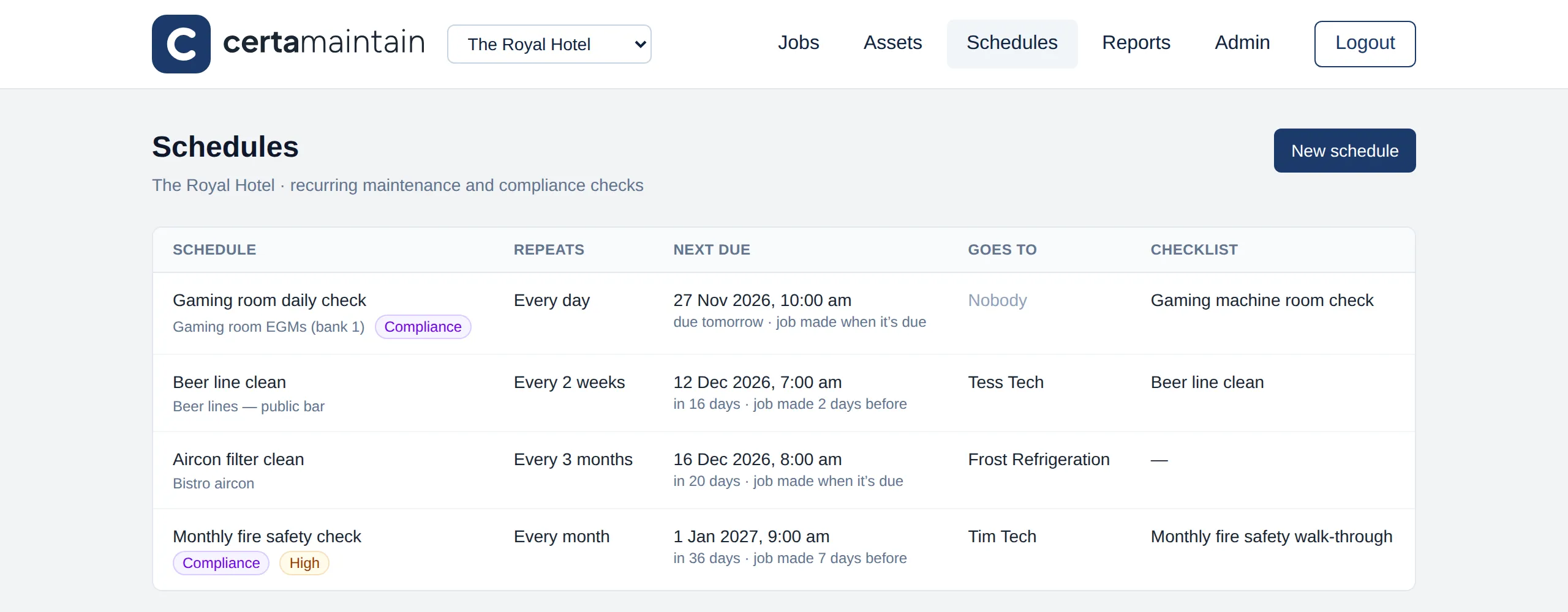
What you get
Any repeat
Every so many days, weeks, months or years, from the first due date, in your venue’s time.
Jobs made ahead
Choose how far ahead each job shows up, so there’s time to book a contractor.
Goes to the right person
A staff member or a contractor business, with its priority set.
With a checklist
Add a checklist, and every job the schedule makes has it.
Compliance counted
Mark required inspections as compliance checks, and they’re tracked in Reports.
Pause any time
Untick Active to pause a schedule, and turn it back on when you need it.
How it works
- Go to Schedules → New schedule and say what needs doing, and for which asset.
- Set how often it repeats and when it’s first due.
- Choose who it goes to and how far ahead the job is made.
- Tick Compliance check for required inspections. The jobs then appear on their own, on time.
Step-by-step details are in the knowledgebase.
Common questions
When is each job created?
Ahead of each due date, by as much as you choose: on the day, a few days before, or a week before, for example. Later due dates follow on from the first.
What if a job is finished late?
The next one is still due on its normal date, so your schedule doesn’t drift.
Can a contractor be sent the job?
Yes. Choose the contractor under Goes to. You record their cost and invoice number when the work is done.
More features
See CertaMaintain at your venue
Start a free 30-day trial. No setup fees and no credit card.